The ability to surface the latest comment or updates on a task in the List view, has been a long-time request, that has had many of us looking to find a solution, until Asana natively adds this feature.

One such person was @CraigD who was looking to create something similar to Status preview text field in a portfolio. He was very close - I simply nudged him in the right direction to experiment with AI Studio - and alas, Craig worked it out!
This is a formal right-up of this solution but using a slightly more generic approach so many of you can apply this to your projects by using AI Studio.
Within any project, carry out the following steps:
-
Create a text custom field and call it “Latest Comment” or “Latest update” or “Summary” or whatever suits your workflow. In this case, we will use “Latest Comment”.
-
Create a rule in AI Studio with the trigger being when “Comment is added”, optionally use a condition and the action, do this: Set Latest Comment to Use AI (use the plus sign on the right of the text box, where you see Use AI below)
Here is the prompt for you to copy-paste and adjust as you wish:


You are an expert in summarizing comments into bite-size text. Whenever a new comment is posted, summarize it and add it’s contents into the ‘Latest Comment’ field.
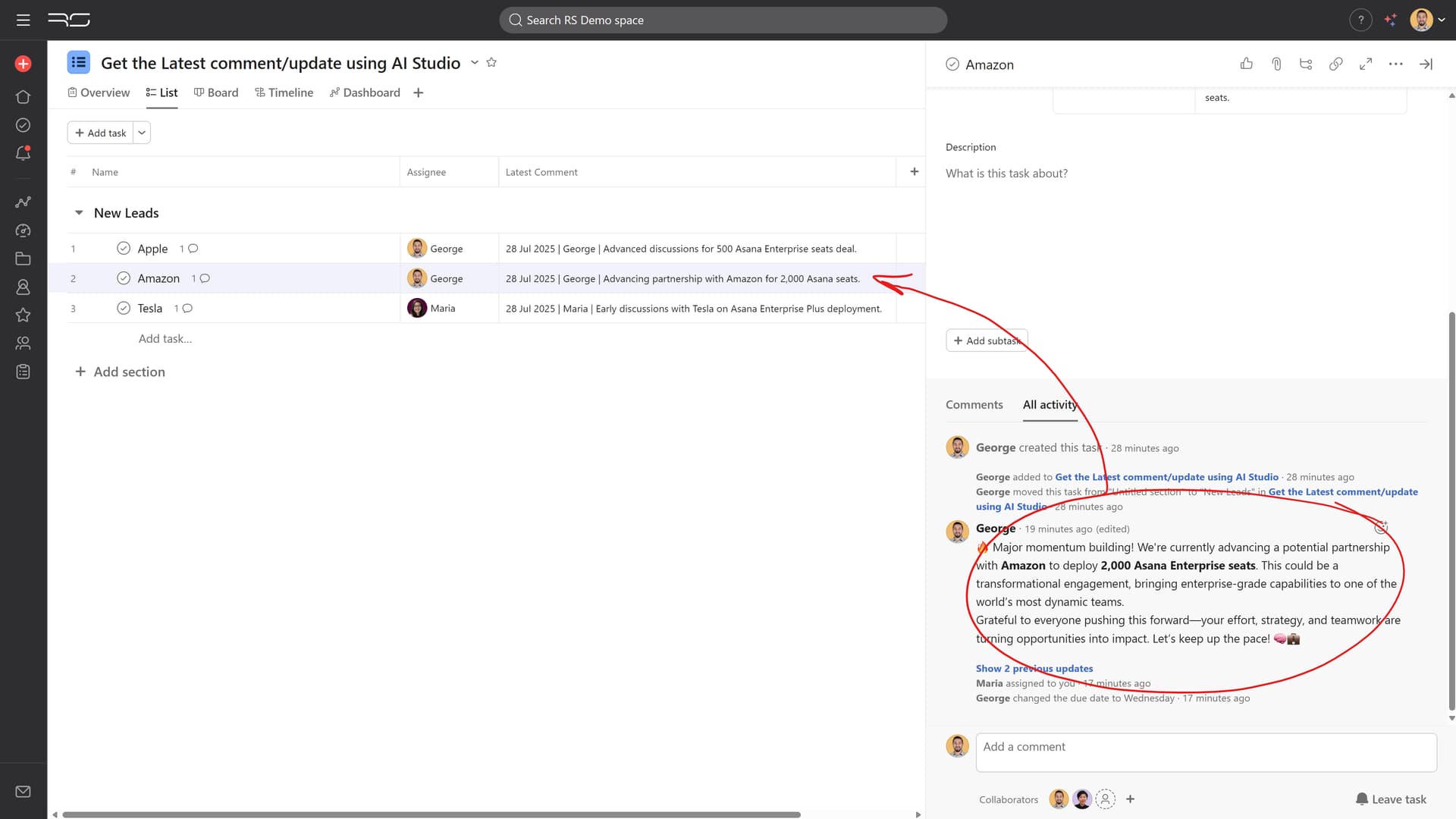
Follow the below format: {The date that the comment was posted in DD Mmm YYYY} | {Commenter name} | {Summary of comment}
The summary of the comment should be 10 words or less, summarizing only the latest comment. Keep the summary concise, including the key information from the comment. Do not restate compliments, appreciations or background context.
- Optionally, adjust the AI Studio settings to use GPT-4o mini (to reduce the credits used) and use Task data and comments (no need to review activity or linked tasks) to increase speed.

Here are some more examples of comments within a task and the resulting summary that is surfaced in the list view, using AI Studio:

Please also check out @CraigD 's initial post for more tips and and great additions, here and here.
Notes:
- If you are on Enterprise or Enterprise+ plans you could optionally use the ‘Run script’ action instead of AI Studio; that is, if you code it, of course!
- If you have Flowsana, this can be achieved using its Variable Substitution capability, as noted here by @Phil_Seeman.

 ) that your single AI Studio rule would reside in, as well as the text field. It would then trigger for any task that lands in that project whenever a comment is posted from any of your projects that your bundle is added to.