Hi Asana Community,
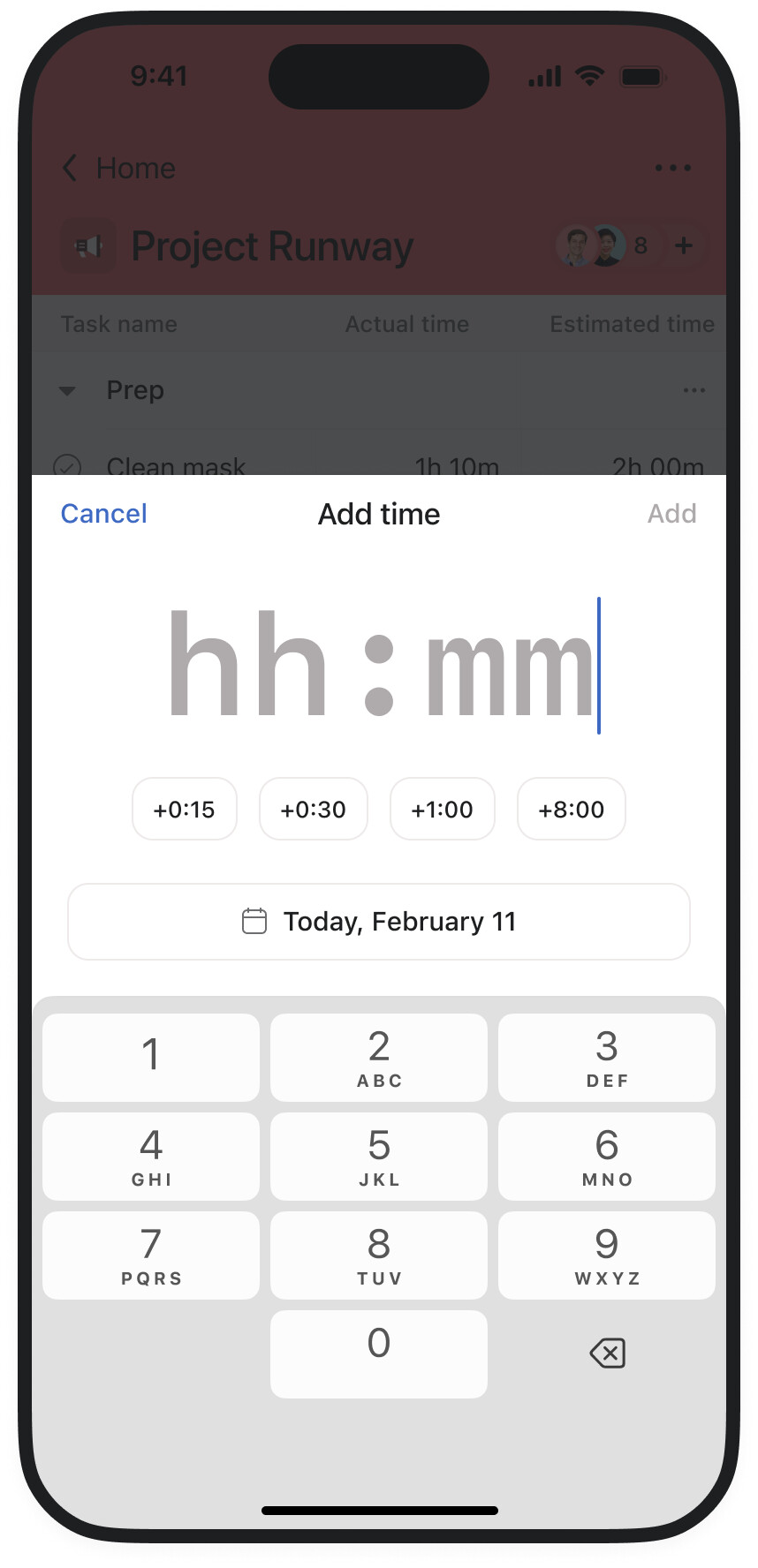
Today, I’m excited to announce time tracking support is now available on the Asana mobile app, bringing the power of accurate time logging directly to your phone wherever work takes you.
Key mobile time tracking features:
- Log time entries: Add manual time entries when you’re away from your desk
- Monitor time: See all the time entries logged on a particular task, on the task level.
- Seamless sync: All time data syncs automatically with your desktop account
Whether you’re working remotely, traveling between meetings, or managing projects in the field, you can now capture every billable minute without missing a beat. Mobile time tracking helps ensure accurate project billing, better time awareness, and improved accountability for distributed teams.
FAQ:
-
Is this supported on both iOS and Android? Yes, you can access time tracking features directly in the Asana mobile app on both iOS and Android devices.
-
Does mobile time tracking work offline? Time entries will sync when you’re back online, ensuring no data is lost even when working without an internet connection.
Let us know if you have any questions or feedback!
10 Likes
Amazing! We’ve been waiting for this for years. So much of our work is away from the computer that mobile time tracking is absolutely critical to adopt Asana’s native time tracking.
@Emily_Roman would you be able to confirm if the “start timer” is a fast follow or still floating out there on the “someday” horizon? Until we can get accurate through the start/stop timer we’ll still be stuck on 3rd party timer tools.
6 Likes
Hi @Tanner_Wilson, I’m the PM leading this project, thank you for this feedback!
While we don’t have a set timeline for the “start timer” feature yet, we’re actively gathering feedback and working on improvements. Your input is really valuable and helps us prioritize the next steps.
I’ll be sure to update you as soon as we have a confirmed timeline.
4 Likes
@Mishka_Belibassakis, huge thanks for your work on this project! Super exciting to see any resources given to the time tracking part of Asana. Our whole business revolves around time resource management.
Not having timers on mobile is the #1 reason we’re stuck on 3rd party time tools.
We’re in the creative sphere, so we run our whole business based on timers. Without timers, we get into flow on a project and then later look around and say “ohhh my gosh how long did that take? Uhhh…” and then don’t know what to bill.
For us, the timer feature is what makes time tracking actually accurate. Daniel Kahneman’s planning fallacy studies over and over have shown how utterly horrible even PhD students are at estimating time, and that’s true looking forward or back.
“I think I spent… an hour?” on this is not accurate, it’s not “actual” time. Manually entering in “actual time” is usually not actual time, it’s just an estimate looking back.
The best or maybe only way to get real time data is to 100% commit to a timer habit so you can see how long things consistently “actually” take. Then you can use that as future basis for time estimates or cost estimates.
But for that timer habit to be 100% of the time, it has it work on both desktop and mobile, or the habit breaks. So we’re still stuck on 3rd party time tracking, for now at least!
Fingers crossed mobile timer can be prioritized! 
7 Likes
I understand this rollout was a significant effort for your development team, but without a functional start-and-stop feature, the system only captures subjective data.
1 Like
Without an actual start/stop timer on mobile the time tracking feature is still of no use to us.
Our users are predominantly mobile based.
Assuming that the start stop (floating??) timer is coming to mobile at some stage I have a follow up question
I know that this time tracking feature has been available for a while on desktop, but I still am trying to understand how it is supposed to work with tasks assigned to one user, but multiple people working on a task. Is there a way for multiple users to see a task in their my task list?
Does the time tracking export reporting differentiate between users that have tracked time to the task?
While I agree with everyone that a functional start and stop feature was really what I was looking for, I still want to say THANK YOU THANK YOU THANK YOU for the progress on this. This is HUGE!
1 Like
Have to agree with the crowd on this one and say that the missing piece for our team is start and stop timing on mobile. Especially with Timesheets rolling out as an add on, if we could get functional start stop on mobile it would allow us to get rid of the clunky third-party apps for time tracking and house everything in Asana. Any updates on timeline for this?
Awesome. Been waiting for this for years!
@Mishka_Belibassakis wanted to throw my feedback in there that a start timer would be awesome! Thanks for your work on this and adding time tracking to mobile!
While I am very excited about this, I only see the ability to add time on mobile to estimated time and not actual time on mobile. Please advise.
PS: don’t forget to update your Asana app, as previous versions might show an error message 
Thank you for this new feature. Nice work!
Plus1 vote for a start-stop tracker. Some clients are billed by the hour, i am.now using a separate app for this but would love to use asana.
Hi Asana Community!
Great news - you can now sign up for early access to mobile start/stop timer feature, launching in March!
Check out the dedicated thread for details and to join: here.
3 Likes