Hi everyone,
What I’m trying to do:
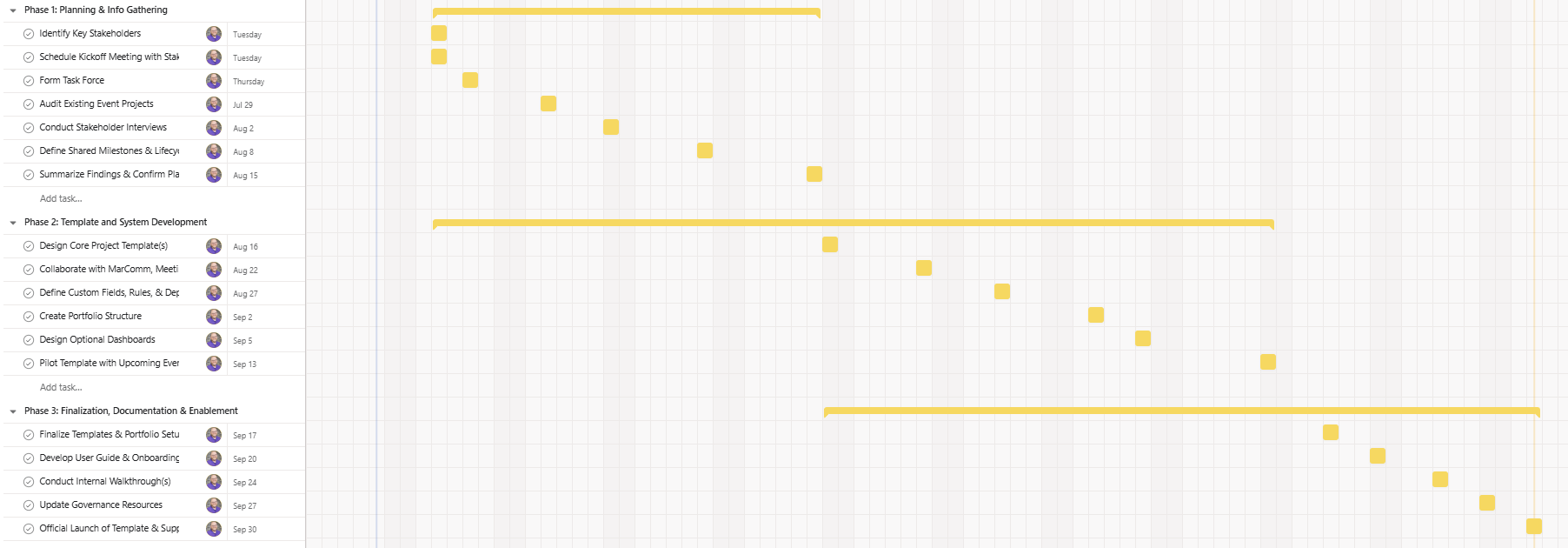
I’m using Gantt view to visualize my project timeline, and I expected the bar for each section to represent the start and end dates of the tasks within that section.
What I’ve tried so far:
I’ve reviewed the task dates, adjusted start and due dates, and checked for dependencies to see if they were causing the bar to extend. None of these seem to explain the behavior.
What’s confusing:
The section bar seems to span much longer than the tasks it contains. I feel like this didn’t happen before, but I’m not sure if I’m misremembering or if something changed.
I’ve attached a screenshot as an example. I’ve noticed this happening frequently in my account and with multiple clients, though not consistently.
Does anyone know what determines the length of these section bars?
Thanks in advance!
Hi @Wayne_Hedlund1 , this looks like a bug but before we call it that, can you confirm that there are no filters enabled that would be hidding any tasks that may be causing this issue?
The length of the section bars in a Gantt view are determined by the earliest and lastest task within that section.
Hi @Richard_Sather
Confirmed. No filters. Sorting by Start Date. No dependencies. Group by Sections.
I’m curious, can you reproduce the issue at all?
It’s odd I’m the only one which makes me think I’m missing something…
Wayne
Hi @Wayne_Hedlund1 , no I cannot reproduce this issue - seems fine in my Asana space and demo space.
Sorry for the obvious question but did you try refreshing your browser, or restarting the desktop app?
If you still have an issue, try these troubleshooting steps, (particularly try the incognito/private tab) and if you still have an issue, then please create a support ticket, here: https://help.asana.com/s/get-support or by following the instructions here: How to contact our Support Team
Thanks for the tips @Richard_Sather
I’ll need to do a deeper dive into browser cache and whatnot. But I made this quick video showcasing me building a project from scratch. It actually shows Section 2 line bar pushing to cover Section 1 in both scenarios where the dates precede or come after Section 1 tasks.
Thanks for the video @Wayne_Hedlund1, the bug is clear. I usually notice a short delay where the section bars remain for a couple of seconds in their previous state but then they snap to the latest dates of tasks within their section. In your case, they seem to remain in their previous state and not updating their length correctly.
If you create a ticket with support, you can refer them to this thread so they can also see your video.
Hi @Richard_Sather .
I checked my cache and browser settings and even logged in as a different user on a totally different chrome profile . . . and I tried it in the Opera browser. No changes.
Thanks for troubleshooting with me. I’ll open a ticket and refer back to this forum thread.