Hi all, how to create a task from Slack directly into a section of a proyect?
Thank you.
1 Like
Hi Dani and thanks for your first question on the forum. 
As far as I know, with the Slack Integration, you can’t select an Asana project section directly from Slack.
However, if you use Asana Business plan (or above), you could create an Asana custom rule that will push all new tasks added to the project to a certain section.
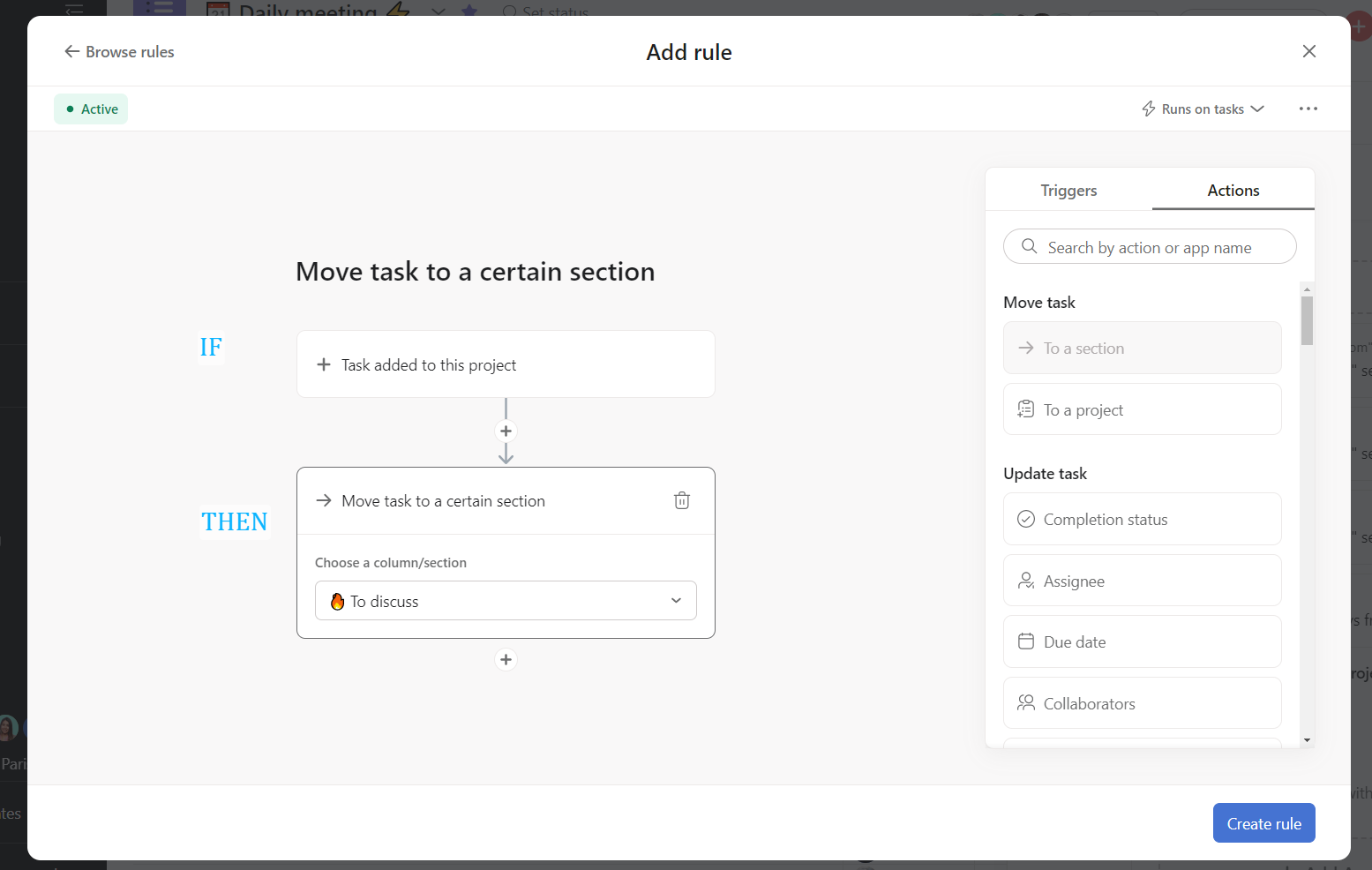
If you are looking for more advanced rules of integration, you might consider the following flow : Slack > Zappier > Asana
I hope that helps, if not, don’t hesitate to continue the conversation here.
Best,
Arthur
1 Like
looks like its applicable on all tasks created, rather created manually from the projects or created by the slack. Any solution only for slack?
An idea could be to use a “buffer project”.
Project A (buffer) will be dedicated to receiving the Slack tasks and redirect them to project B, in the right section
buffer project?
can you elaborate more please?
@Omer_Butt2 - fairly certain @Arthur_BEGOU is referring to a project that exists solely to accept your tasks from Slack and immediately move them to the appropriate section of your real project. You would create the task in slack in this “buffer” project. In Asana, you would have a rule on this project that when a task is added, move it to your “target” project in your specifically desired section.
1 Like
@Stephen_Li @Arthur_BEGOU I understand now.
But the problem is that, in my case, we have a lot of projects in Asana and we create tasks from Slack while selecting the right project from the dropdown. For example, if I create a rule that whenever a task is added to the project “Buffer,” it moves to a specific section of that project. However, every task is related to a different project. This rule only moves my task to one specific project, which I selected in the rule.
Any thoughts on that?
Thanks, @Stephen_Li , that’s exactly what I had in mind 
Hi @Omer_Butt2
If you keep changing your request here, It will be harder for us to answer.
(your 3 last questions contain 3 different requirements  )
)
Before I spend more time looking for a solution, I will let you specify your case with as many details as possible.
Have a great day 
@Arthur_BEGOU Sorry about the confusion.  After you gave me the “Buffer” solution, this whole scenario came to mind, so I wanted to discuss it with you.
Basically, I have a lot of projects in Asana. What I need is for a task created from Slack to move to the specific section of the selected project (which we choose from the project directory).
Regarding the “Buffer” project solution, it sounds good, but in this case, it seems we can only move the task via a rule in one specific project.
For example, if I have projects A, B, C, and Buffer, and I create a task in the “Buffer” project, the rule applies to move the task to a specific section of Project A. This solution works fine for that scenario. However, if I create a task from Slack and it needs to go to Project B or C, this plan wouldn’t work, right?
Any thoughts on how to tackle this situation?
1 Like
In that case, sorry, but I don’t see a perfect solution.
You could decide to create as many “Buffer” projects as you have projects:
- Buffer A sends to Project A
- Buffer B sends to Project B
- …
And in a near feature, I believe some AI features will allow having smarter conditions. We would be able to create a prompt that says something like “Pick only the tasks coming from the Slack integration” and the system will understand.
But that’s not available yet. 
1 Like
I have almost 100 projects, so I can’t create a buffer project for each of them. It’s very weird. 
Thanks anyway.
One more question: Is there any possibility to convert a task into a subtask when it’s added to a project via a rule?
Indeed, in your case, that’s an issue.
Something to consider is that, for my point of view, the limitation is that you are not allowed to select the section directly from Slack, that would solve the issue.
Maybe you could consider create a topic in the Product Feedback category and get people vote for it (with the hope of Asana adding it on the roadmap).
An example with another request for the Slack integration: Status updates to Slack
No, you can create subtasks to the task but not converting the task into a subtask that would be automatically nested below existing tasks.
That action is not available in rules yet.
You maybe take a look at the Product feedback list, I wouldn’t be surprised that this request already exist, but I couldn’t find it with a quick search (Search results for 'rules subtask #forum-en:product-feedback' - Asana Forum)
Wishing you all the best with Asana
Arthur
What should I do with the best wishes for Asana? It seems like everything I want to do isn’t possible here… LOL!
Also, the first link you mentioned is not working.
but anyhow. thank you!
@Omer_Butt2 you do realise my colleague Arthur spent a considerable amount of time helping you for free? We don’t work for Asana, we help users like you on the forum to the best of our abilities.
2 Likes
@Bastien_Siebman oh yeah.
I appreciate your help man. Thank you so much @Arthur_BEGOU 
1 Like