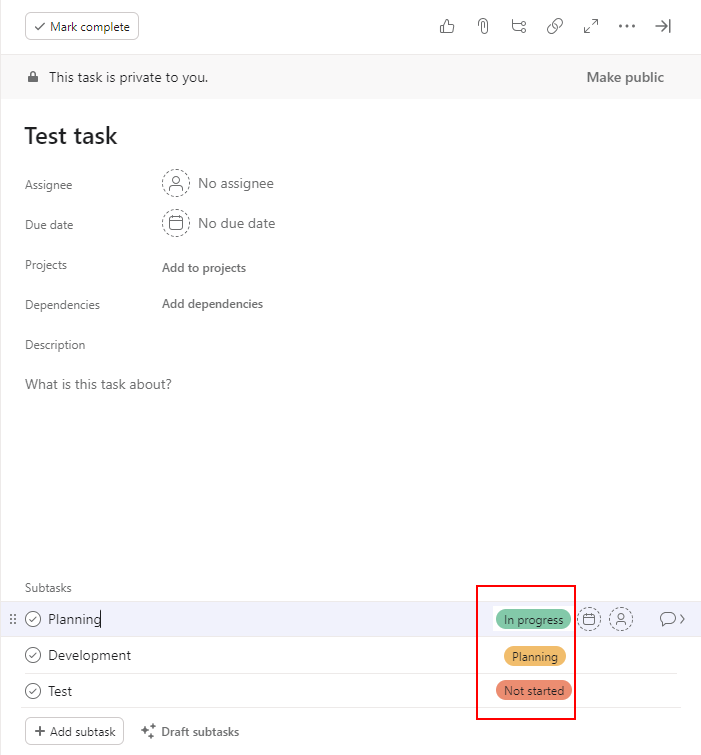
I have a custom field called “Stage” that I set in my subtasks. When working on a task I’d like to have a glance at the Stage of all of its subtasks. Currently, this requires clicking on each subtask to view the Stage. Attached is an image of what the goal should look like.
Not a solution, but were you aware that you can see and set custom fields of all of a parent task’s subtasks in a project’s list view (if you are not too filtered/sorted and still have the expand/collapse icons)?
Yes, this helps. I was approaching it from the perspective of working inside the task.
On larger screens this does the trick.
On smaller screens or on condensed views I have to bring the custom field column over to the left side to see the value. Otherwise the task area on the right side takes up a lot of space.
I know some have asked about allowing custom/inherited fields being automatically expanded on a subtask. Beyond that, I’d love to see custom fields on a subtask appear on the overall task view as well. Much like the category columns show up next to the task title while in list view.
Don’t forget to click the title to scroll to the top and vote by clicking the Vote button; that’s the quickest and most effective way to express your support for a request.