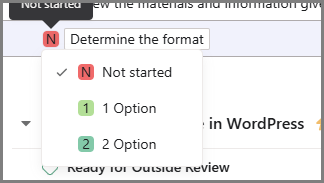
I have created a project template with a custom task type and custom rules. The idea is that when I select one of the options on the custom task type, (see image 1) it will create new tasks (rule logic on image 2) that will then get sorted to the appropriate sections using a different rule (image 3) based on the task status set during the task creation rule. But my problem is that its not creating the tasks and I cannot figure out why it is not working.
Image 1
Image 2
Image 3
Your screen shots seem to show something different than your description, which may be the issue.
Your description talks about a custom task type, but the trigger and condition in the rule screenshot doesn’t reflect checking a custom task type but looks to me like it’s checking a custom field. To check a custom task type, your trigger/condition would look like:
Hmm, I understand what you are saying. But I have it set already to that task type from a project template so I won’t be changing the task type but the option.
So from the creation of this project from the template this task will be set to my task type Option RG.

I want to be able to change it to Option 1, like selecting Changes Requested on an Approval task.
When: I change the Option RG task
Check if:
Option RG is set to
Option 1

Do: Create a task
OK, got it.
Your screenshot 2 and 3 are identical; I think #3 was supposed to be something different?
Oops! You’re right. It was supposed to be this picture of the rule I used to sort the new tasks coming in which is based on a custom field that is set when the task is created through the rule:
Got it, thanks.
The issue, though, is that the first rule (screenshot #2) is not running, right? So the first thing to check is whether the rule is running at all (vs. running and not performing the actions). Go to a task where its status is Not Started, change it to Option 1, and then check that task’s activity history. Does it show that the rule ran?
Correct.
I’ve discovered something: If I change the task type from a normal one after creating a project from the project template and then select Option 1, the rule is triggered.
However, if the task had a custom task type already set in the project template, simply changing it to Option 1 after the project is created does not trigger the rule.