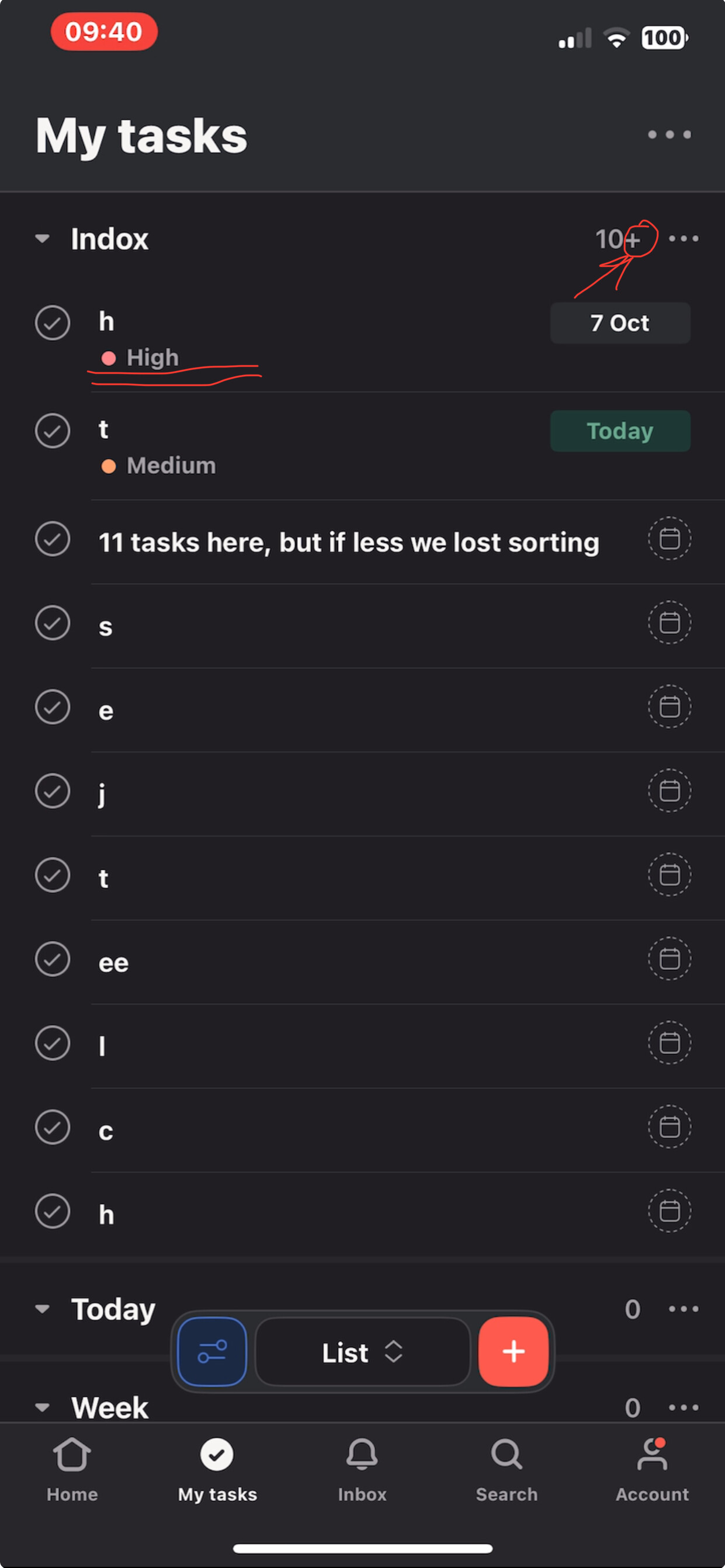
Hi! I noticed strange logic for task sorting in custom section (list view). It appears if task quantity is less than 11 in section. I found another topic about this issue in the forum: Sorting issue in Different sections in my task
it seems that in iOS app we have got bug depending on quantity of tasks in section. If quantity less then 11 function of field sorting hierarchy works not correct.
Please send it to dev team or give me a suggest how I can communicate to developers. I need this functionality very much. Please help to fix it.
Here is my test case:
Here is sorting rule: priority field, then due date. Task with high priority in the top of the list. Take a look at “10+”, here is 11 tasks in the section Inbox:

Then I moved third task from the top to another section

As a result, the order was broken because of bug (tasks quantity less 11, now it 10). Take a look at task with high priority. It is not in the top now:

But if we move back the task and after REFRESH(mandatory) the list, we can see the correct order (take a look at “10+”)