Hi everyone,
I’m Stephanie, a Content Marketing Manager at Asana. I’ll share how our team uses AI Studio to help address challenges around creating derivative content from a long, “core” asset.
 Challenge we faced
Our marketing team has many content creators that often specialize in specific formats, like social media, articles, emails, landing pages, and more. It’s common for multiple content creators to develop “derivative” pieces from a longer, core piece of content. For example, writing emails to promote a new ebook or report.
Challenges we’ve faced with dispersed content creation:
- Consistency in how the core piece of content is positioned across derivative content
- Efficiency in following best practices or the latest guidance, especially when multiple creators and/or contractors are involved
So, we built an “editorial assistant” project with AI Studio to help!
 What the AI Studio editorial assistant does
We have a project in Asana that does 4 things that help us (with room to expand):
- Summarize a long piece of content
- Create an outline for a social media carousel post
- Create an outline for an email promoting the long form content
- Create an outline for a blog article based on the long form content
These are the sections of the project:
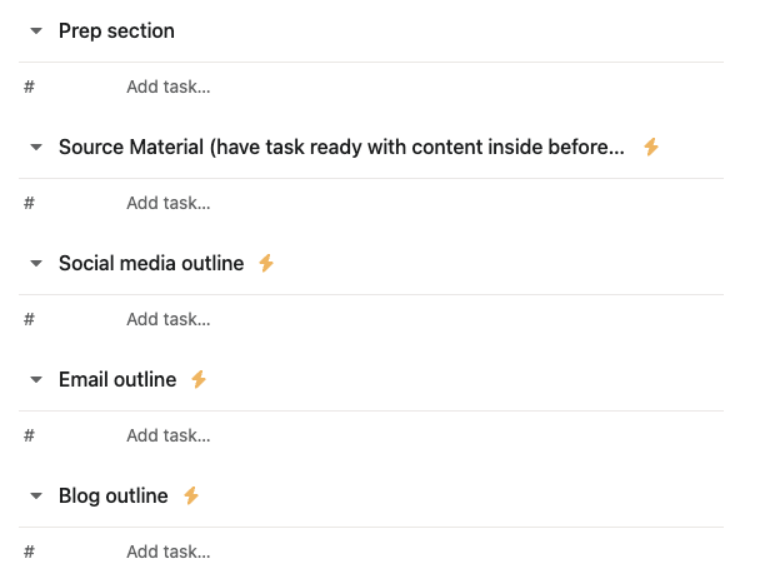
When a task is added to the “Source material” section and includes a link, attachment, or task description, we have rules to add a summary in a comment, and create 3 new tasks in each of the “Outline” sections.
These are the current instructions for the summary:

A summary is generated from the source asset, and then we can share that summary across teams and content creators. We always require that content is checked against the original source, but to get multiple creators understanding the context quickly, a summary is a helpful starting point.
This is what an output of the summarizer rule looks like:

Then, each of the “outline” sections will have an output that is tailored to that type of content. For example, here’s the instructions for the email outline and the output:
Email outline instructions:

Email outline output:

The intent is that no matter how many people are working on derivative content, they at least have a starting point (from the outlines) that aligns to Asana’s brand voice and follows best practices. The magic from there is all in the content creator’s hands.
 What we’ve learned so far:
- Different teammates use Asana slightly differently - testing the project out with multiple people really helps, so we can account for any usage variants in the project set up or AI Studio rules.
- For example, the AI Studio rules in this project don’t run as intended unless the task that’s added to the “Source Materials” section already has the core content included. I had to add instructions to ensure people prepped the tasks first, before adding it to the section.
- The AI doesn’t always return the same result, or the results in the same format.
- For example, if we run the summarizer rule on the same content twice, the summary will come back slightly different even if the core asset stays the same. It hasn’t been a problem, but it’s good to know in case we need to address this in the future.
- Another example, the content outlines didn’t have a consistent format until we added more specific instructions into the rules.
- Most importantly - it works and saves our team time! We’re excited to continue to refine this workflow as we encounter new requests.
 One place to learn more about AI Studio workflows and how to set it up for your team is the Academy course Building smart workflows with AI Studio.
 Thoughts, ideas?
Would something like this be helpful on your teams? What ideas do you have for improvement after looking at our AI instructions and rules? 
