Hi Asana Community!
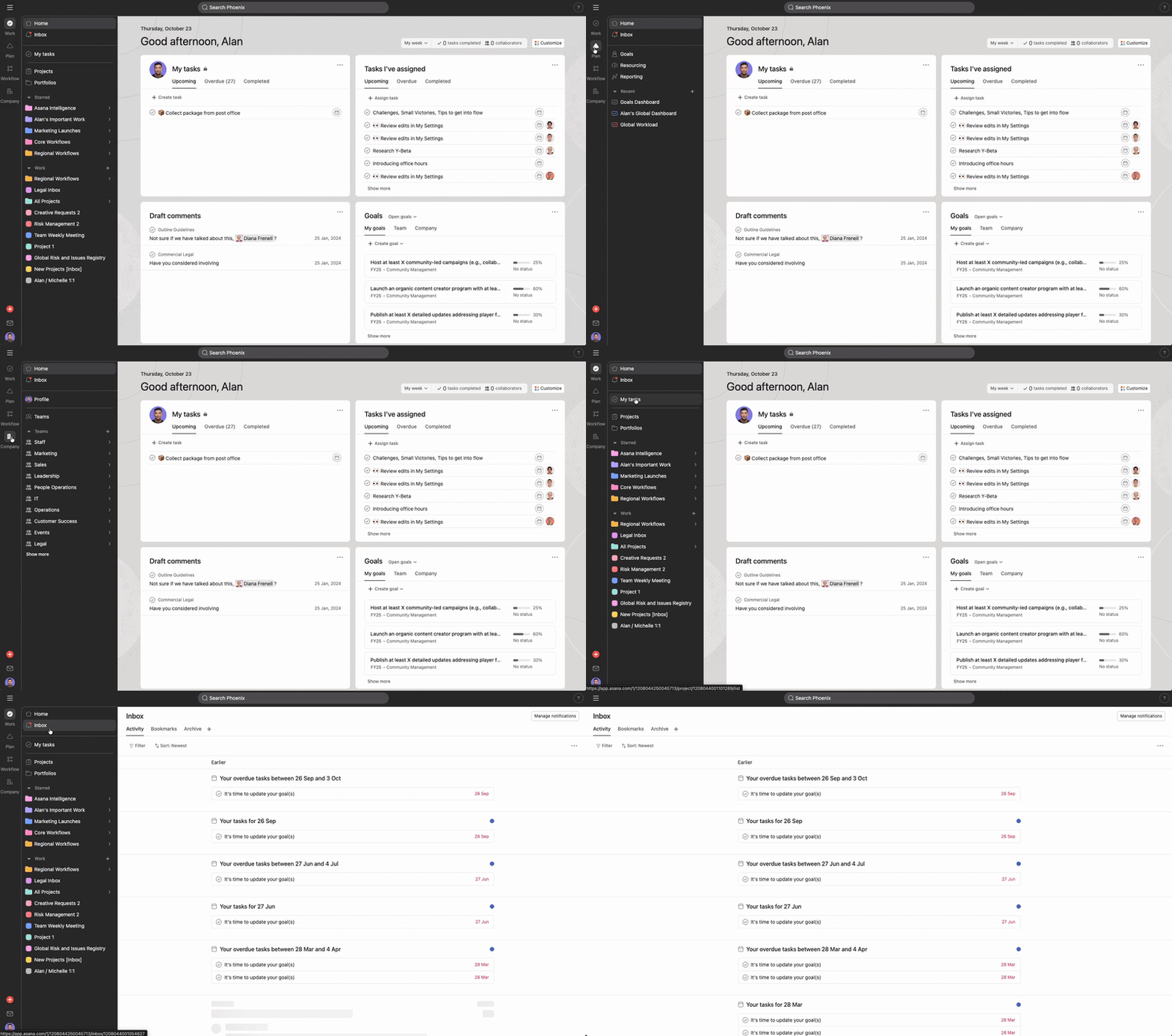
I’m excited to share we’re testing a new navigation experience that organizes Asana features by the type of work you’re focusing on, making it easier to find what you need when you need it.
This update includes:
-
Focused sidebar experience: Navigate based on the mode of work you’re executing (like Work, Plan, Workflow and Company)
-
Better feature visibility: Each features get the spotlight they deserve.
-
Scalable design: As Asana continues to build new ways to improve how you work, new features will have a natural home within the navigation.
-
Reduced distractions: Stay focused on your current task without navigating through unrelated features.
This is part of our ongoing effort to make Asana’s navigation clearer and more intuitive, building on previous sidebar improvements.
FAQ
-
How do I know if I’m part of this test? If you’re selected for the test, you’ll see the new navigation automatically including the Work, Plan, Workflow and Company tabs. The test includes both new and existing domains across all paid tiers.
-
What if I prefer the current navigation? This is a test to help us understand how the new navigation performs. Your feedback during this period is incredibly valuable in shaping the final experience.
-
Will this affect my current workflows? All your existing projects, tasks, and features remain exactly the same, we’re just organizing how you access them to make your workflow more focused and efficient.
As always, we’d love to hear your thoughts and feedback! If you’re part of this test, please share your experience in the comments below. Your insights help us build the best possible navigation experience for everyone 
Please note this update is currently only available to select customers. We will share updates on the roll out progress on this thread. Stay tuned!
23 Likes
We’ve been using the beta version of the new Mode nav for about a month and love the direction this is going!
#1 The “Work” Mode is the same Asana everybody already knows – I never had a single person come to me confused about the changed UX. Starting with an existing familiar Mode makes for a very easy transition! Cheers to the Asana team for making this so easy to adopt.
#2 The new Modes Nav finally gives a place for features that have never had a good home, like Bundles, Custom Field gallery, or Forms gallery. They’ve all been in limbo. Collecting all those under “Workflow” is brilliant. A lot of what I do is workflow design for our team, so this is a HUGE help to have all those in 1 place.
#3 Modes gives room for future features to have a good place to live. Asana can continue to grow into a very powerful work-in-one-place software, and have clear places for those new tools to go instead of a single “mode” with a thousand visible buttons. This might be the biggest reason the Modes change is so important: it makes Asana’s future growth a lot more seemless.
Take Bundles for example – when Bundles rolled out, it kinda rolled under the rug for a lot of users. There wasn’t a good place for it to go. Invisible is hard for adoption for Asana. But for most users, making Bundles easy to see would clutter up the UX. Now with Modes, for people in charge of workflow design Bundles is very visible next to their other workflow design tools.
Overall – I’m excited to see the future growth within Plan and Company Modes. Plan would be a great place to house some of the upcoming time tracking / time sheet / resource management features. The Company Mode could expand to make finding user profiles easier and more manageable. Lots of possibilities with this new Modes Nav! Cheers to the team that worked on this.
4 Likes
SOOOO excited to hear that there’s a solution to easily find bundles, custom field galleries, forms. etc. I had to relearn every time where to go to find these things. Can’t wait to see this in action.
4 Likes
I have mixed feelings about the new nav experience. There are parts that are nice to separate out the different functions while also keeping some things together. The two parts that bugs me are how much extra real estate it takes up on the left of my screen, considering that the top bar is still there and now mostly wasted space. I wish you could collapse the new part since I’m not frequently switching outside of the work/tasks function but not collapse my tasks and project list. The second is that half of the nav is now for features that are on higher priced tiers that we don’t have. I don’t really need a whole section devoted to bundles or planning (resourcing), as we don’t pay for that. Would be nice to hide that somehow. I can see how that’s useful for folks that pay for that and use it to have it in one place, but it’s not useful for us.
18 Likes
As usual, Asana project management tool, without warning or consultation with it’s customers, decided to roll out a release that essentially minimizes/nests the teams views where we navigate to projects.
Not only is this inefficient and hazardous to production workflows, it’s not even a good new layout.
Please roll back or have the ability to make the teams > projects be front and centre on the workflow.
AND STOP ROLLING OUT CRITICAL CHANGES TO PROJECT FLOWS WHEN YOU HAVE HUGE COMPANIES USING IT FOR WORKFLOW PRODUCTION.
Absolutely nonsense going on over here.
11 Likes
Hi everyone and thanks so much for sharing your feedback about the new navigation. We really appreciate you taking the time to share how this update feels for you.
@Connor_O_Shea @Megan_Gill We’re currently running an experiment with this new navigation as part of our ongoing effort to make Asana clearer and more intuitive, building on previous sidebar improvements. Your feedback helps us better understand your needs and will be considered as we evaluate future updates before the full rollout. We’ll make sure to keep this thread updated on the progress and any changes during the A/B test, so you and the community can stay in the loop
Thanks again for sharing your thoughts and helping us shape the new Asana navigation experience.
1 Like
@Emily_Roman - I love how many features now have a clear place to live (like Forms, Bundles, etc.), that’s really helpful! However, I agree that most of the time is spent in Work mode for about 90% of users, especially for those who mainly use the system rather than build workflows or update configurations.
Having all the modes visible all the time makes the sidebar feel cluttered and takes up valuable visual space for daily use. I’d suggest adding an option to collapse or hide the modes so that users can keep their workspace focused on what they use most, while still having quick access to the other modes when needed.
Let me know if this kind of feedback should be shared somewhere else 
12 Likes
I’m not mad at it but I do find it really annoying that Starred is not ALL starred things. Portfolios and Projects that are starred only show on the Work tab but if you have a starred group you have to switch to the Company tab. This means starred is no longer saving clicks but this change has actually added more clicks to getting to a group and starred or not is the same amount of clicks.
Would love to potentially see My Tasks and Starred in the static box with Home and Inbox.
12 Likes
I’m not a fan. It wastes a lot of space.
11 Likes
How can users that aren’t a member of this forum submit feedback in BOTH the browser and desktop version.
Also, I really wish there was a way at the admin level to see who within our org is part of ANY a/b testing. Its extremely frustrating when not even the admins have the same experiences, much less all of our users.
Lastly, where was the communication related to this change coming? I have one from July regarding beta access, but can’t seem to find a recent one (outside of this post) notifying users of this change coming. I could’ve missed it, but can’t seem to find it. Would’ve been extremely helpful to send a proactive communication to our users, vs a reactive one
7 Likes
Upon first review, I love that we now have a central location to find project templates, rules, forms, bundles, and fields! this is a great improvement in visibility especially when it comes to administration and support of a larger team.
I also don’t mind the breakdown of work, plan and worflow, as I see many of our users spending most of their time in work. But I’m curious to hear from others in my organization on their thoughts. It seems the sidebar is the same size as previous, so i don’t find the menu taking up more space, but the use of space seems a little less optimized
We did feel a little blindsided with this change when logging in this morning but are quickly adapting to communicate this change with our teams/users and taking this as an opportunity to collect feedback from our teams - in which I’ll add meaningful feedback to this thread. In the future, would love a heads up on fundamental changes.
Hi everyone and thanks for all your comments here!
We are sharing all feedback from this thread with our product team, but if you’d like, you can also provide more details about your workflow and share any changes you’d like to see directly through our in-product feedback form, located at the bottom of the navigation.
1 Like
I would love to see the sidebar collapsible but only leaving the rail, as well as collapsing the rail too.
But one thing I miss from the really early release I experienced was the ‘Starred’ mode where I could pick and mix and have my own mode essentially, combining Portfolios, Projects and Teams (which would address some of the issues people are raising above) and also the unique ability to star My tasks which is missing in other modes but Work. Too bad that’s not in this release…
Let’s add a ‘Starred’ mode! 
PS: You can vote for this here: Add a ⭐ 'Starred’ mode to the new sidebar redesign (2025)
9 Likes
While I appreciate the effort to streamline the interface, I’ve found the new navigation update has introduced a couple of usability issues on the desktop version:
-
Font Size: The font appears noticeably smaller, which makes it harder to read and interact with comfortably. This change feels like a step back in terms of accessibility and user experience.
-
Wasted Space: The layout now feels like it has a lot of unused space, especially around the navigation elements. It gives the impression that the interface is less efficient, even though it’s meant to be more compact.
-
Collapsibility Options: I think it would be much more useful if users could collapse the smaller bar while keeping the main navigation bar open. This would allow for better customization based on individual workflows and screen sizes.
Overall, I’d love to see more flexibility in how the navigation is displayed, especially for desktop users who rely on clarity and space efficiency.
7 Likes
I wholeheartedly agree with the comments that this new interface wastes space, looks worse than the previous one, and has overall made the desktop app experience much worse for me. Please enable an option to opt out of using this interface. I have been a dedicated Asana user for years and am very disappointed with this change, especially as I do not use any of the “features” being given visibility as they are not relevant to the plan at the level that my company pays for. It’s ridiculous and frankly MORE distracting, not less, to take up so much of my workspace with paid features that aren’t even enabled for me.
7 Likes
Agreed. I saw this change hit my profile earlier this week, but didn’t get the walk-me pop-up until this morning.
@Emily_Roman I don’t have access to the new navigation experience yet so I can’t speak to the full experience, but I do have a question. Did the quick ‘Create’ button move to the bottom left corner? If so, that seems like an odd area to place such an important CTA.
2 Likes
My first reaction was “ugh. ew. why.” but I also know that change is hard, so I took a moment to sit with this nav for a bit.
I agree with a lot of what everyone else has said – both positive and negative. My two chief complaints are:
- Takes up too much real estate.
- Please, please give us a space for “everything starred.” In my use case, popping between my “Team” space and my work happens daily. Having them in separate menus is cumbersome.
Could you reincorporate the new options into the existing nav? Maybe something like this?
Otherwise, I really like that I can see rules and tasks and bundles all in one place. SO much easier to manage.
2 Likes
I like the look of the new side panel, but it’s incredible frustrating for two reasons:
- We’re on the starter plan. 90% of the navigation is irrelevant and unusable for me.
- The two things I used the most, teams and projects, are now in separate locations and has made my workflow worse.
It feels like us starter plan folks are second class citizens. Between the huge “upgrade” button (I already pay you, that shouldn’t be there!) and the forced navigation on features I don’t use or need, I’m wondering if there is ever a time where I’ll be able to customize my sidebar. This would be, IMHO, the most valuable way to make this sidebar useful regardless of what “tier” subscriber you are.
Alternatively, the “starred” section should be global. IE, I have starred a project, and a team, but they are not in the same place because I now have a completely separate place I have to check to find it.
4 Likes
Yes, love the new way! Specially the place for bundles, etc. And the overview of company’s.

1 Like