The task keeps changing from one member to another when a task is marked complete. How can I stop this from happening? I need the assignee to stay the same.
Hi @Amarpreet_Japra , if you open a task that does this actuon, scroll to the bottom, select ‘Activity’ and note the  (a rule) which has assigned it to another person. Click on the rule name to open the rule editor so you can either pause it or delete the rule.
There seems to be no rules associated to this project. And when I try to click the lightning bolt, it does not let me unfortunately. How can I fix this issue?
Could you post a screenshot? When you hover your mouse over the rule name, does it say perhaps a private rule owned by ‘someone’ that you could reach out to?
Yes this is the message I receive when I hover over the little lightning bolt. However, I reached out to that specific team member and they mentioned that they have no rules set other than one to move their completed tasks over and project specific rules (like moving over tasks to another section). Is there anything else that could be causing this?
Well, did the team member you mentioned, click on the icon or rule name that the activity log says it assigned the task to person X once it is completed?
Bottom line, someone logically has access to it. They don’t have to look for it in a project’s Customize menu or in their My Tasks rules - if they click on the rule that does what it says, it will just take them to it so they can edit / pause / delete it.
I understand this forum is public, but if you can share any redacted screenshots, that would really help us help you. 
Thank you for your help. I was able to get a screenshot from my teammate. This is the only rule she sees when she clicks on the lightning bolt under activity. We need this rule to run so that she can keep her tasks organized. Is there a workaround for this? or would you happen to know what may be causing it?
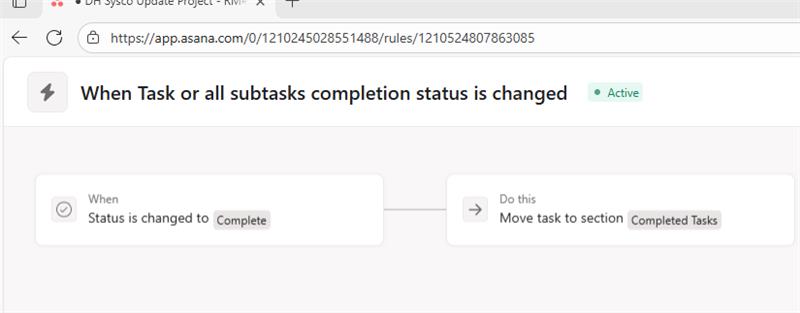
Hi @Amarpreet_Japra1, that rule does not seem to be the one that is reassigning tasks; it’s just moving th task to a Section. There could be anither rule that triggers when tasks are added into that section.
You should look for the rule in the activity log that states something along the lines of ‘Rule X assigned to person A’.
It could also be a chance that the tasks are being added to a private project but with a private rule that I believe should still be mentioned in the activity log. It just needs more investigation.
I uploaded the picture. It seems to have happened again to another task. Also the teammate did duplicate this task, would that have caused it?

So when you click on the “ Asana assigned to… Today at 10:16” what do you see?
(duplicating the task is not the issue because that happened 2 days ago. The rule mentioned above happened right after the task was completed, also at 10:16)

Where your red arrow is, click on “Asana”. it will show up the rule which assigned the task to you. And hopefully everything will be explained
The only rules associated with the task is the ones I posted earlier. It seems to keep happening with this particular project and we are unable to find a solution
What specifically displays on your screen when you click the word “Asana” where Bastien pointed out?
And so did I, 2 days ago.. I’m curious! 
1 Like
This is also happening to me with rules set to change status and completion status but no reassigning logic. this seems to be a common issue based on the number of submissions on the forum about this.
1 Like
Hi @Tyler_Heinz1 , did you try to follow the troubleshooting steps we have offered above so you can find the rule that is causing this action?
Yes, @Richard_Sather the two rules that ran are included below. I could only post one photo because of new user restrictions on this forum. The two rules referenced appear identical because they are a part of our project template to move completed tasks to a corresponding “Completed” section. One of these is for the project in question, the other is for my own My Tasks. The task reassigning has happened only a handful of times and appears to be a bit random. For example, the next task in that project did not reassign after completing, following the exact same two rules as you see below. Thanks for showing interest in helping to figure out this supposed bug.

Hi @Tyler_Heinz1 , thanks but the screenshot we should be looking for is the activity of the rule that does the reassigning action, similar to this screenshot which is showing the task details’ All activity tab.
Look for the  that says
 Asana assigned to ...
Then click on the Asana which will open the rule in question.
If you are not sure which project the rule is located in, copy/paste the URL into a new browser tab and close the rule to reveal the project it lives in. (thanks to @Bastien_Siebman for that cool tip)
Hope that helps!
@Richard_Sather yes, I have that screenshot as well just couldn’t include more than 1 at a time due to forum restrictions. Here is the activity in that task and my first screenshot is the full detail view of both of those rules. No task reassigning rule is included in this.

1 Like