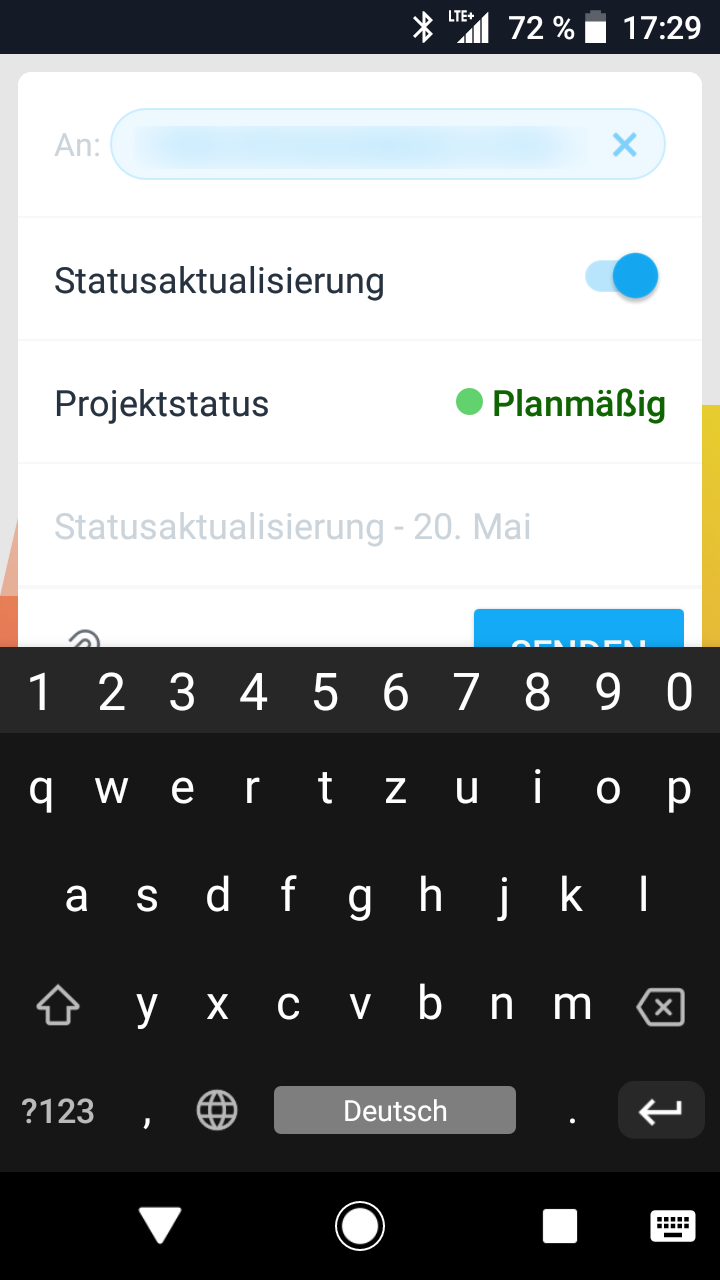
Briefly describe (1-2 sentences) the Bug you’re experiencing:
Steps to reproduce:
Browser version:
Upload screenshots below:
Hi @Robin_H , thanks for taking the time to report this.
In order to investigate this further, please confirm the following:
Have you tried reinstalling the Asana app?
Can you confirm your device model and OS version?
Can you confirm your Asana app version?
Looking forward to your reply!
1 Like
App version: 6.45.5
Thanks for confirming this information @Robin_H !
I have escalated this issue to our Development Team and I’ll keep this thread updated as soon as I have more information.
Just out of curiosity, are you able to scroll down and up after selecting the test field?
Looking forward to your reply. Let me know if you have any follow up questions in the meantime.
No scrolling, that’s the point.
Thank you!
Hi @Robin_H , thanks for your patience!
Our development team has confirmed this issue should now be fixed. Let me know if the issue persists or if you have any questions
1 Like
system
3 July 2020 05:39
7
This topic was automatically closed 16 days after the last reply. New replies are no longer allowed.